How To Fix Webcam Problems
With broadband internet widely available, many PC users are actively using their webcams for video chatting and online meetings. Not only does the increased bandwidth facilitate the use of video over the internet, but improved webcams and better video compression also help a lot. But if your hardware is not working as it should be, a webcam is not much fun. So dealing with webcam problems can be a necessary evil. Webcam problems often simply mean there is no image to be seen, but in other cases, you might actually get an error message or will not be able to select the webcam as the video source in your programs.
In Windows Live Messenger, for example, you might get webcam error 0x8a70013, indicating a problem with the webcam device.
Steps to solve the webcam problems
Check the webcam connection
One of the very first steps is of course to check your webcam connection. Most webcams use the USB port to connect to the PC, so check if your USB cable is properly plugged in. For built-in webcams, these steps of course do not apply. Many new laptops have a built-in webcam. Also, try connecting your webcam directly to your PC instead of through a USB hub (if you are using one).
Enable the webcam
But don’t forget to check if you need to manually activate your webcam. In most cases, the webcam will be automatically activated by software that can use the webcam, but for some computer brands, it is necessary to press a certain key combination to activate the webcam (it will be a Function key, either with Alt or Ctrl or the Fn key, but check the laptop manual for details).
Some known key combinations:
<Fn> + <F9> (Alienware laptop webcams)
<Fn> + <F6> (Packard Bell laptops, MSI laptops, Lenovo laptops)
<Fn> + <F10> (Neo laptops, some Asus laptops)
Check the webcam in the Device Manager
The next thing to do is to check your Windows Device Manager and see if all hardware is recognized and installed properly. Use the Scan for hardware changes in the Action menu to make sure Windows lists all available hardware devices.
It might be that the hardware is recognized as a camera, but the right drivers are not installed. The yellow exclamation mark will indicate a problem.
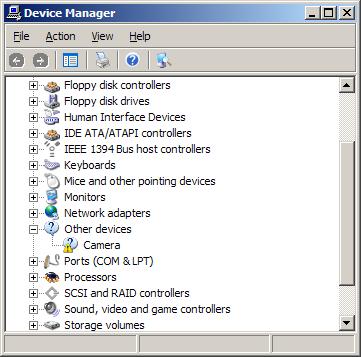
If the device is not recognized in Windows, it will be listed under Other Devices.
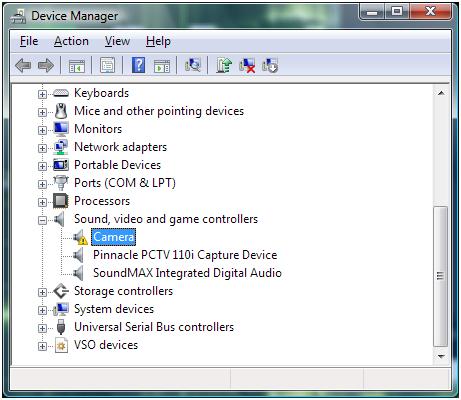
In either case, you can try to update the drivers. Right-click the device, and in the popup menu select Update Driver Software (in Windows 11 – Update driver). Then follow the instructions on screen, but make sure you allow Windows to search the web for updated drivers.
In case no driver for the webcam can be found, you can try a third-party driver-finding program that scans your PC for installed hardware and allows you to install missing drivers.
Reinstall the webcam software
If this fails, the next step would be to uninstall the software that came with your webcam. Use the Add or Remove Programs feature in the Control Panel. If that does not work you can use a third party uninstaller.
After uninstalling the software, restart your PC and then reinstall the webcam software. In most cases, this will solve the problems. Depending on the software, you might need to unplug your webcam during the software installation. For many HP systems, you need to install the CyberLink YouCam software, which can be downloaded from the HP site (for Windows 7 and Windows 8). This program allows you to check the webcam feed to see if it is working.
Check the software settings
If the drivers and webcam software are correctly installed, and you still cannot see any video, there can be a problem with the program settings. Most chat and meeting software have a configuration option to select the video source for the webcam feature. If you have multiple devices that qualify for video, you might need to select your webcam device as the source for the webcam feature in that program.
Some webcams and programs require additional software, although that should be installed with the webcam if things are right. But is does not harm to check if your Java, Flash (discontinued in 2019) and Quicktime software (version 7.6) are installed and up to date. But certainly check your DirectX software, since all video applications, including webcams, use DirectX for video processing. Try downloading the latest DirectX version and install it (Windows XP: DirectX 9.0c – Windows Vista: DirectX 10 (version 11 for Vista with SP2) – Windows 7: DirectX 11 – Windows 8, 8.1: DirectX 11.2 is only available through the Windows Update function – Windows 10: DirectX 11.3 and 12 are included with Windows and updates are only available through Windows update).
Manual focus correction
Lastly, if your webcam’s image is not sharp, check to see if it has a focus ring. A blurry image can sometimes simply mean the webcam is not in focus. Adjusting the focus through the ring can solve that problem.
Adjust video capture quality
Other picture quality problems with webcams can be addressed by changing the video capture properties for the webcam. Most programs that can use a webcam will have the option to access the properties of the video source, which will bring up the video capture properties window.
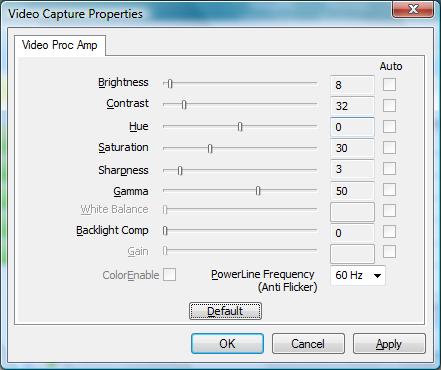
Do keep in mind that not all settings will be enabled depending on the webcam and the webcam driver installed on your computer. In the example, you can see that some settings are disabled. The example shows the video capture properties for an Acer Crystal Eye webcam.
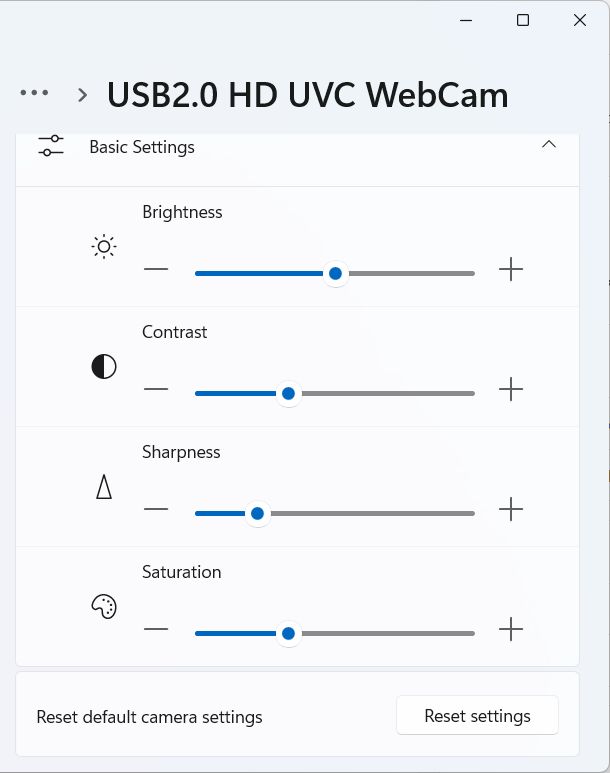
In Windows 11 the Camera properties look different. Access them by opening Settings from the Start menu, then select Bluetooth & devices in the left-hand pane, click Cameras in the right-hand pane, and then click your camera.
Camera Privacy Settings Causing Webcam Problems
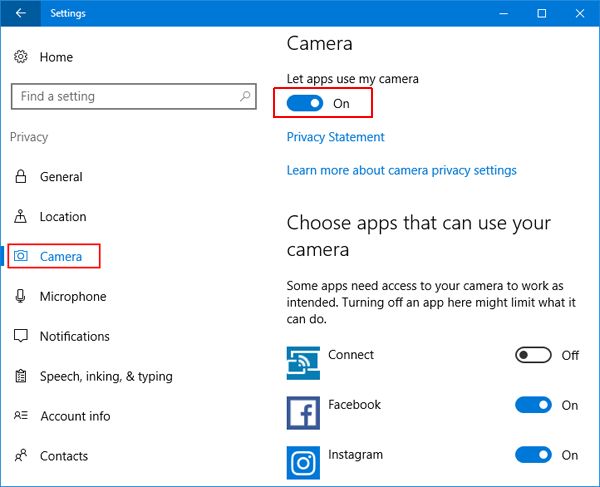
Starting with Windows 8.1 (and Windows 10) there is a privacy setting in Windows that allows (or blocks) access to the camera. If access to the camera is blocked to Apps, your webcam will not work in certain applications.
Here are the steps to ensure that the camera is not blocked in Windows 10:
- From the Start menu, select Settings.
- In the Settings window, click on Privacy.
- Make sure that the setting for Let my apps use my camera is turned On.

Fix Flipped Camera Issues
Having the image from the camera shown as mirrored or upside down has been a long-time problem on some Windows-compatible webcams. In most cases, the right device driver for the camera will fix the issue.
If the camera image is not showing correctly, or changes to an incorrect image when using it to capture video, try the options below to fix it.
Registry tweak to flip camera
Although this solution is not applicable to all webcams, it is good to check if it is applicable in your case.
- Open the Registry Editor using the Windows + R keys and then type
regeditin the Run box. Press Enter or click the OK button. - In the Registry Editor, select the top-level entry (Computer), and then use the File menu Export option to make a backup of the registry.
- Next, locate the following registry entry:
HKEY_LOCAL_MACHINE\SYSTEM\CurrentControlSet\Control\Class\
{6BDD1FC6-810F-11D0-BEC7-08002BE2092F}\0000\VIDEOPROCAMP - With the key selected, change entry in the right-hand panel called
HFLIPfrom 0 to 1 (or from 1 to zero, depending on the current value). If the entry does not exist, you can create a new DWORD (32-bit) Value with that name.
Note: Use theVFLIPentry for a vertical flip.
If you cannot find the key, this option probably will not work for your webcam.
Use software settings to flip the camera
If you cannot get the webcam image corrected in Windows itself, using the driver, settings, or registry tweak, you can often use program settings to correct the webcam image.
Do keep in mind that many video chat programs show you the mirrored image of the webcam while people on the other end see the correct image of you. So consider if it is really something that needs to be addressed!
In Zoom you can toggle video mirroring to change the image.
- Click the up arrow in the Video button on the Zoom meeting window.
- Select the Video Settings option in the popup menu.
- In the Video settings pane, unmark the option Mirror my video.
- Close the Video settings pane.
- Close and restart Zoom (close it completely from the Taskbar icon).


If you prefer working with web-based interfaces for online meeting and chat programs like Zoom, Google Meet, and others, installing a browser plugin or extension is the better way to go. For Chrome, there is VideoMirror, which is free and supports camera mirroring. There are others, but make sure to check that the mirror function is available in the free version before you install it.
If you are using your webcam for instant messaging / video chatting with one of the popular chat programs, have a look at ManyCam, which allows you to record your webcam but also allows screen recording, which allows you to record any video stream! Third-party programs like ManyCam act as a virtual webcam and even work to mirror the camera image in Discord, which is not otherwise possible.
Windows 10 Camera Problems
In one of the initial Windows 10 updates, a camera problem was introduced that needed a specific fix. The update causes the camera to stop working in most apps trying to use it. The update pertained to the Windows Frame Server Mode for processing webcam images. Microsoft disabled support for webcams using MJPEG and H264 compression. The way to address this is to disable the Frame Server Mode to allow it to work.
- Open the Registry Editor in Windows.
- Make a backup of the registry using the File -> Export option.
- Navigate to the following registry key:
HKEY_LOCAL_MACHINE\SOFTWARE\Microsoft\Windows Media Foundation\Platform - Right-click in the left-hand pane and select New in the popup menu.
- Select DWORD (32-bit) Value and enter the
EnableFrameServerModeas the name. - The value should be zero (0) by default, if not, change it to zero (0) by double-clicking the new key.
- If you are running a 64-bit version of Windows, you need to repeat these steps for the following registry key:
HKEY_LOCAL_MACHINE\SOFTWARE\WOW6432Node\Microsoft\Windows Media Foundation\Platform - Close the Registry Editor and check if the camera issue is fixed.


A restart of Windows should not be required, but if the fix does not work, restart Windows to make sure the changes take effect.
Realtek Webcam Problems
If your Windows system is using a webcam that is using Realtek components, a specific problem can occur. The Windows service host will report errors that report the camera frame service terminated unexpectedly. The error is caused by a Realtek driver file (RsProvider.dll). The file resides in the path: C:\Program Files\Realtek\RsProviders\RsProvider.dll (unless your system drive is not the C-drive).
You can either delete or rename the RsProviders folder or try a registry option to disable it. Lenovo provides a patch for its affected systems to disable it. The patch removes the following key:
HKEY_LOCAL_MACHINE\SOFTWARE\Microsoft\Analog\Providers\RsProvider
Before you change the registry, make a backup! If you decide to delete the RsProvider folder, also make a backup first (the better option is to try and rename it first).
Windows 11 Camera Troubleshooter
Microsoft has included a troubleshooter feature in Windows 10 and Windows 11 that can help fix common problems. So, if you experience a camera-related problem in one of these Windows versions, run the Camera Troubleshooter first.
- Open the Settings from the Start menu.
- Select Bluetooth & devices in the left-hand pane.
- Click Cameras in the right-hand pane.
- Select your Camera (USB2.0 HD UVC WebCam in the example).
- Click the Troubleshoot button.

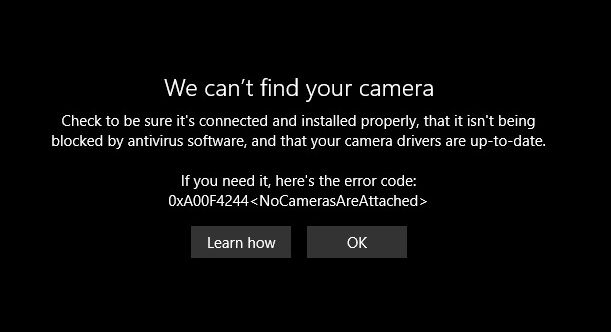
Errors that can be solved this way include the 0xA00F4244 error showing NoCamerasAreAttached. The Camera window will show the message “We can’t find your camera“.
A second frequent error in Windows 10 and Windows 11 relating to the webcam is error 0xA00F429F WindowsShowFailed. The message, in this case, is “Can’t start your camera“.
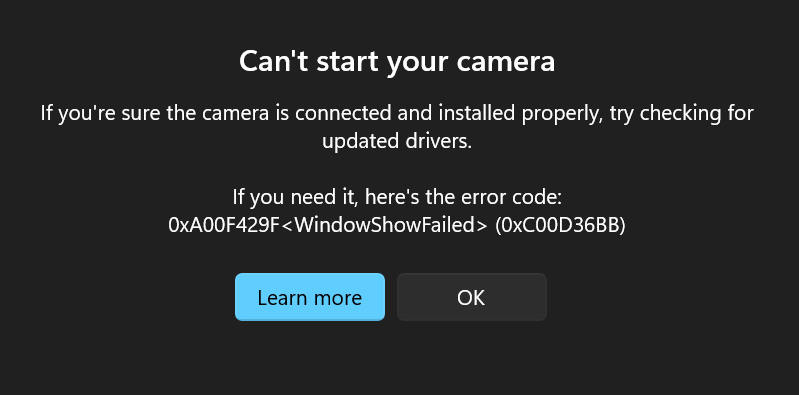
In most cases, this is an App access issue (permissions), but just run the troubleshooter to see if it can be fixed by Windows automatically.



i got a laptop with build in cam on it i try to get on facebook but it don’t work how can i get it work if i did what it tell me to do on here still not working please help me i got emachines laptop thank you
@Kyle-thank you for the information!
@kyle i did reinstall of direct x and now it shows a froven img lol lil closer to getting it back to working and thanks for your continue help in this matter
@Joe – Uninstalling DirectX is not really possible, just try reinstalling the latest DirectX runtime redistributable from Microsoft.
You could also have a look at your network settings, since it seems that all your webcam issues are related to online use. Firewall settings can help fix those issues (define an exception for the webcam application).
For camfrog I know that some codec packs also cause it to not work, although it should not crash in those cases.
@J.W. Holmes – The HP 3100 webcam can have an issue with Skype version 5.0 in combination with the original webcam firmware. HP has a support article on that.
But in general always try to get your hardware devices working properly (like the webcam and the microphone), before you install programs that use them (like Skype and MSN). Generally that gives the best result in those programs picking up and supporting the devices.
From your description it does seem that all problem devices are USB related. If so, try using different USB ports, and if you are using an external USB hub, check if that is USB 2.0 compatible.
For the software to install, always try to install the latest version from the online site (so drivers from the HP site and Skype from the Skype website). Versions on the original CD are often rather outdated. Just make sure you also (re)install the Arcsoft Webcam Companion software that is used for the HP 3100 webcam.
Oh, one more thing, my computer is an Acer quadcore threaded with win7 home delux on it.
My husband installed an HP 3100 webcam and it worked for a time on msn but not skype. Two days later, my computer started to malfunction, nothing working properly, not even my mouse. On the advice of a friend, I uninstalled my webcam and Skype both and things seemed to be working again. I tried to reinstall my webcam using updated drivers off HP’s site, but it stalled in installation. My computer rebooted. I decided to uninstall and try again, but there was no sign of the install or exe file. Should I try with the original CD again and should I install Skype first or after? I still have MSN installed. Also I do have a logitech mic installed and running, do I need to remove that before installing the webcam?
@kyle it works fine in skype crashes camfrog and justs show black screen on websites the only thing i havent done to diagnose the problem is to uninstall and reinstall directx
@Joe – If the webcam is only having problems on a website, I’d suggest you check the Flash Player and maybe also the DirectX settings. But in general flash is used on websites to display a webcam.
@Beejhay – The yellow icon in the Device Manager for your bluetooth devices mean that there is an error. Could be anything from a missing driver, malfunctioning device to a conflict with another device.
For that reason I would suggest you try to solve them anyway. Either reinstall the driver or install missing drivers. If there is a conflict, try removing the devices first (assuming they are external devices).
Only after that you will be able to tell if the webcam problem is related to it.
@Karen-OMG, we both have the same problem!!!
Can anyone please help me why I can’t connect my built-in Webcam Companion 3 on my laptop? I checked the property of it on device manager and the status said “the device is working properly”. If so, why can’t I connect? Idk but, I saw three “Bluetooth Peripheral Device” that has a yellow icon beside it. Is it the cause or not?
Please help me! Any reply will be appreciated.
so i was trying to run two cams with no progam to handle it and now all i get is a black picture on the website i go to how should this be fixed
@joyce – If this happens in all chat programs, I would suggest you first try to uninstall the Logitech webcam driver and software, and then reboot and reinstall it. Only plug the webcam into the USB port after installing the driver or when the installation wizard indicates to do so.
If it remains, try using an intermediate program like SplitCam and see if that can access your webcam without hanging. Which Windows version are you using btw?
@sophie – What is the model number of your advent laptop? And is this a built-in webcam or a webcam that plugs into a USB port?
i have a advent laptop and a advent webcam iv tryed everything and cannot get it to be picked up on my laptop please help.
i have a logitech webcam and when i open it in a chat program it freezes up as does my screen, what can i do?
@Beth – If the webcam stopped working after you dropped it, the cause is probably mechanical (like a loose connection or something). I would suggest you take it to a specialist repair center, as opening a laptop is rather tricky.
I have acer aspire and i dropped my laptop on its side and now my webcam wont work…how can i fix it?
@Tony lfie – I am not familiar with webcam problems on mobile phones. The article here is about webcams on Windows computers. But from what I see online, your problem seems to be a hardware issue. Might be best to have a repair center check it out.
@SJ – The webcam lens for a built-in webcam of a notebook should not be removed. The display in notebooks can be very sensitive and should not be opened other than by a technical specialist. The risk on damaging the screen is too big, and they are costly!
The webcam lens should really only need cleaning from the outside. If that does not help, it must be a different problem.
HI. I did clean the lens but is there anyway to open the front cover and see if there’s anything blocking the view?
mobile webcam 1.0 mail edition is installed in my nokia 6300 which has micro sd of of up to128mb. When webcam is activated, it displays the message ‘camera failed’. Please, what can be done to activate d webcam? Thanks.
@Cameramen – Youcam is not the driver, but the webcam software to use the webcam. Check the device manager to see if you have the Crystal Eye webcam device and if it is working okay. If not, simply reinstall the driver for your Acer webcam.
@liz – Have you tried other chat partners? It could also be that the problem lies with your friend’s PC. If it happens with other chat partners as well, it is indeed something on your end. Check if you changed anything regarding video software or DirectX. If something changed, reverse it (or uninstall it). Blurry webcam images are generally the result of webcam focus issues (only with external webcams), or bandwidth issues (internet connection).
@kartik – Webcam access issues referring to sharing problems like that are generally fixed by reinstalling, but if you tried that and it did not help, try using a program like SplitCam or Manycam. These programs allow simultaneous webcam access by multiple programs, so the issue should not come up anymore.
@SJ – Never seen that problem before to be honest, so I would suggest you check what changed. Any new software installed? Windows updates?
Try using a restore point from before the problem occurred, since it could simply be a configuration issue that is solved that way.
I assume you have checked and cleaned the webcam lens?
Hi. I have an HP Pavilion dm4 with the HP TrueVision HD webcam. It used to work perfectly for a few months. Yesterday, when I connected to Skype, I noticed that only the top portion of my face could be seen on screen. The rest was covered by a dark/black patch, like you get when you’re taking a picture and get your finger in front of the camera lens. Can you help? Thanks in advance.
my webcam says other video applications are running but there isnt any other application running…
hw to solve this…i have tried updating driver,disabling fast acess but nothing has worked..
my webcam was fine but now when in a videocall my friend tells me that she cant see me becase it is blurry but it looks fine on my laptop.we have tried msn,skyoe and facebook cam why is this happening?
tired to solve my Cyberlink Youcam on Acer, when i open it said ‘no webcam detected. try plugging in..etc’.
any solution ?
@Mary – Nkiru ogbonna – If you can’t use the webcam on your HP 620 notebook, try reinstalling the driver for the webcam. I think the HP Universal Camera Driver should be used.
If that does not help, also install the webcam software, which is the actual program to use the webcam.
I have a Hp620 windows 7 inbuilt with webcam ,after i formatted my laptop ,i could use d webcam again n also the bluetooth ,but it appears on the device manager.pls what do i need to do